




-
 Nov 4, 2026
-
 Techno Deviser
-
 20 min read
- Introduction
- What Is Deviser Smart Product Configurator?
- Why Use a Product Configurator?
- Why Customizable Products Need a Better Website Experience
- Main Features of Deviser Smart Product Configurator
- How to Install Deviser Smart Product Configurator
- Which Businesses Can Benefit From the Plugin?
- Deviser Smart Product Configurator vs a Standard WordPress Product Page
- How the Plugin Can Support Better Customer Enquiries
- Practical Example: Configuring a Custom Office Desk
- Why Techno Deviser Developed a Product Configuration Solution
- Frequently Asked Questions
Introduction
Selling customizable products online can be challenging, especially when customers need to choose between multiple sizes, colors, materials, accessories or product variations before submitting an enquiry.
A traditional product page may display a photograph, description and basic price. However, that approach may not provide enough flexibility for businesses offering products with several configuration options.
For example, imagine a furniture manufacturer selling made-to-order sofas. Customers may want to select the sofa type, fabric, color, seating arrangement and additional features before requesting a quotation.
If the website cannot organize these choices clearly, customers may need to exchange multiple emails or phone calls simply to explain what they want.
This is where a WordPress product configurator can make the experience more practical.
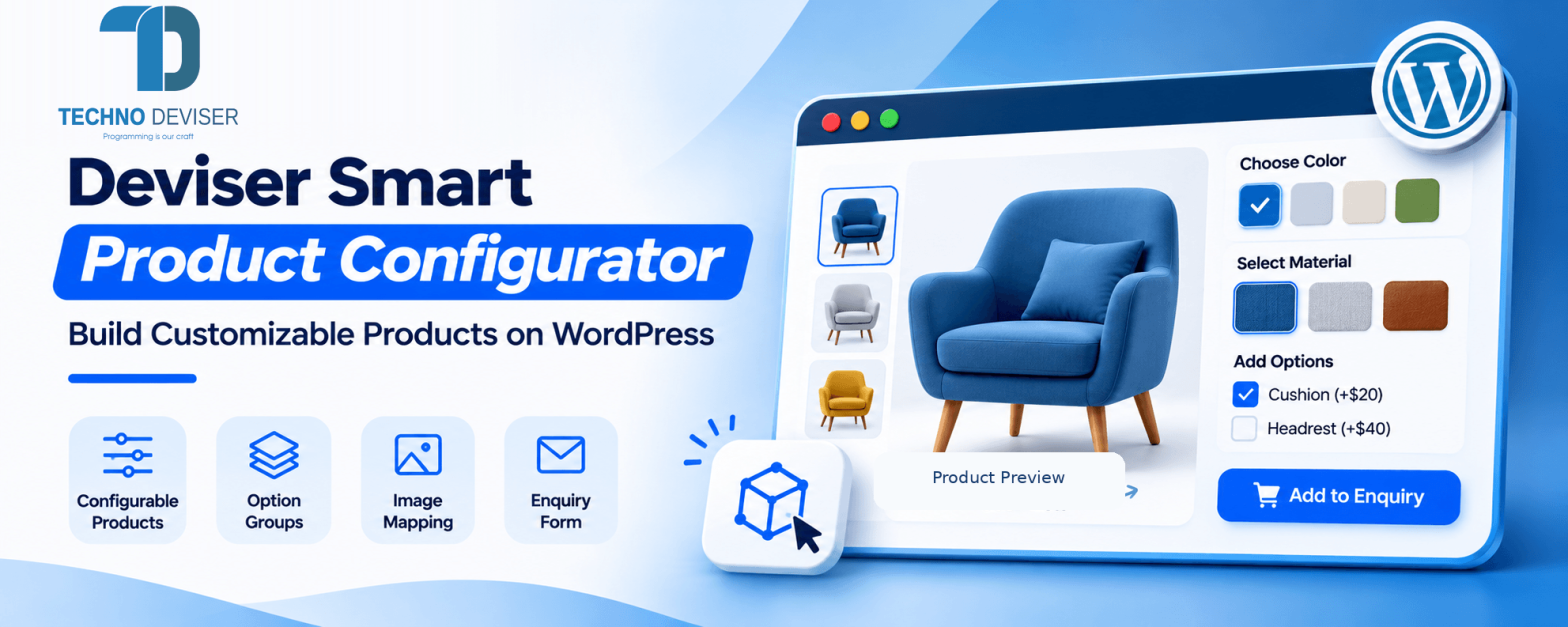
Techno Deviser introduces Deviser Smart Product Configurator, a WordPress plugin designed to help businesses create configurable product experiences with organized options, live image previews, calculated prices and built-in enquiry forms.
Instead of requiring customers to describe every product requirement manually, the plugin provides a structured interface where visitors can explore available configurations and review their selected options.
Moreover, website administrators can organize product categories, create hierarchical groups, configure option prices and choose different frontend layouts.
The plugin is particularly relevant to businesses that offer products with several choices and want to collect more detailed enquiries through their WordPress websites.
In this article, we’ll explain how Deviser Smart Product Configurator works, explore its main features and show how businesses can configure customizable products step by step.
What Is Deviser Smart Product Configurator?
Deviser Smart Product Configurator is a WordPress plugin that allows website administrators to create products with selectable categories, parent groups, subgroups and individual options.
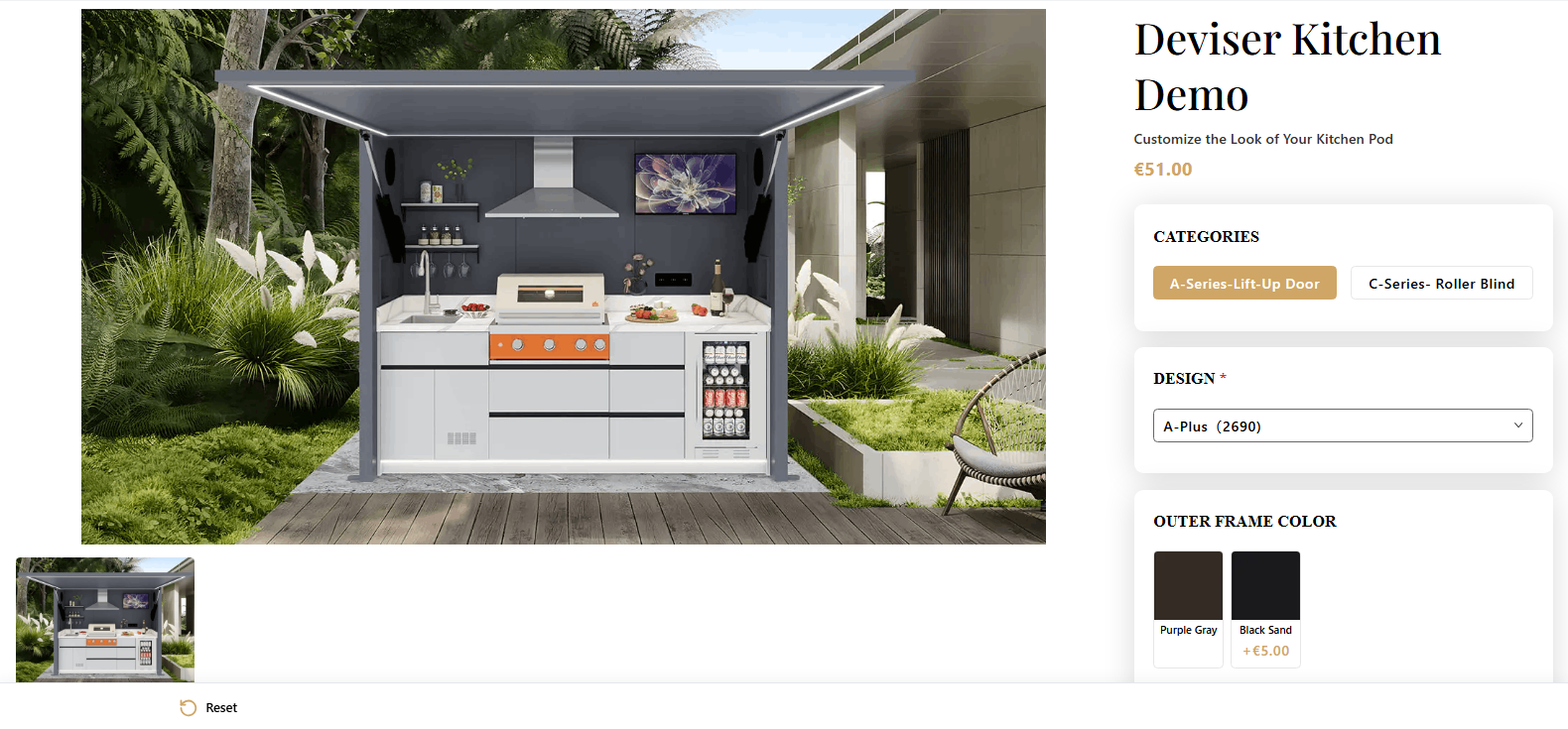
It supports configurable frontend interfaces where visitors can select product features, view matching images when available, see calculated totals and review their selections before submitting an enquiry.
The plugin is available through the official WordPress Plugin Directory.
Key Features at a Glance
- Product Types and category management
- Hierarchical Product Groups and subgroups
- Selectable Product Options
- Button, Radio, Color Swatch, Image and Dropdown selectors
- Base Product Pricing and option price adjustments
- Live Product Image Preview
- Image Combination Mapping
- Four Frontend Display Layouts
- Responsive Product Configuration Interface
- Built-In Custom Enquiry Forms
- Configuration Summary
- Product-Specific Shortcode
- Typography and Layout Settings
Together, these features provide a structured way to present configurable products without requiring administrators to build a separate interface for every individual product combination.
The plugin’s official WordPress.org page documents these capabilities and provides 12 screenshots demonstrating the configuration process.
Why Use a Product Configurator?
Customizable products involve more decisions than standard products.
For example, a business selling office furniture may offer different tabletop materials, frame colors, sizes and accessories.
A conventional product page could list these possibilities in a long description. However, that may require visitors to work out which options apply to their preferred configuration.
A configurator organizes those choices into a more guided experience.
Customers can work through the available groups, review their selections and submit their preferred configuration for further discussion.
Therefore, product configuration can help businesses explain complex offerings more clearly while reducing ambiguity in initial customer enquiries.
Why Customizable Products Need a Better Website Experience
Modern customers often expect to understand available product choices before contacting a business.
However, products with multiple variations create challenges for both buyers and sellers.
Customers May Struggle to Understand Available Options
A long list of product features can become confusing.
For example, a manufacturer may offer several product models, each with different materials, colors and optional accessories.
Customers need a simple way to understand which choices belong to which product group.
Product Prices May Depend on Selected Features
A basic product may have one starting price, while premium materials or additional components affect the total.
Without clear price information, visitors may need to contact the business simply to understand how different choices influence cost.
Product Images May Not Represent the Selected Configuration
Showing only one product image can make it difficult for customers to visualize their choices.
For example, choosing a different color or component may significantly change the product’s appearance.
A corresponding image preview can help visitors understand the configuration.
Enquiries May Lack Important Product Details
An enquiry such as “I want a customized cabinet” may not provide enough information for a useful response.
The business may need to ask about size, material, finish and additional components.
A configurator can collect selected options before the enquiry is submitted, helping the business understand the initial requirements.
Main Features of Deviser Smart Product Configurator
The plugin combines product organization, visual configuration, pricing and enquiry collection.
Each feature contributes to a different part of the product selection process.
1. Organize Products With Categories, Groups and Subgroups
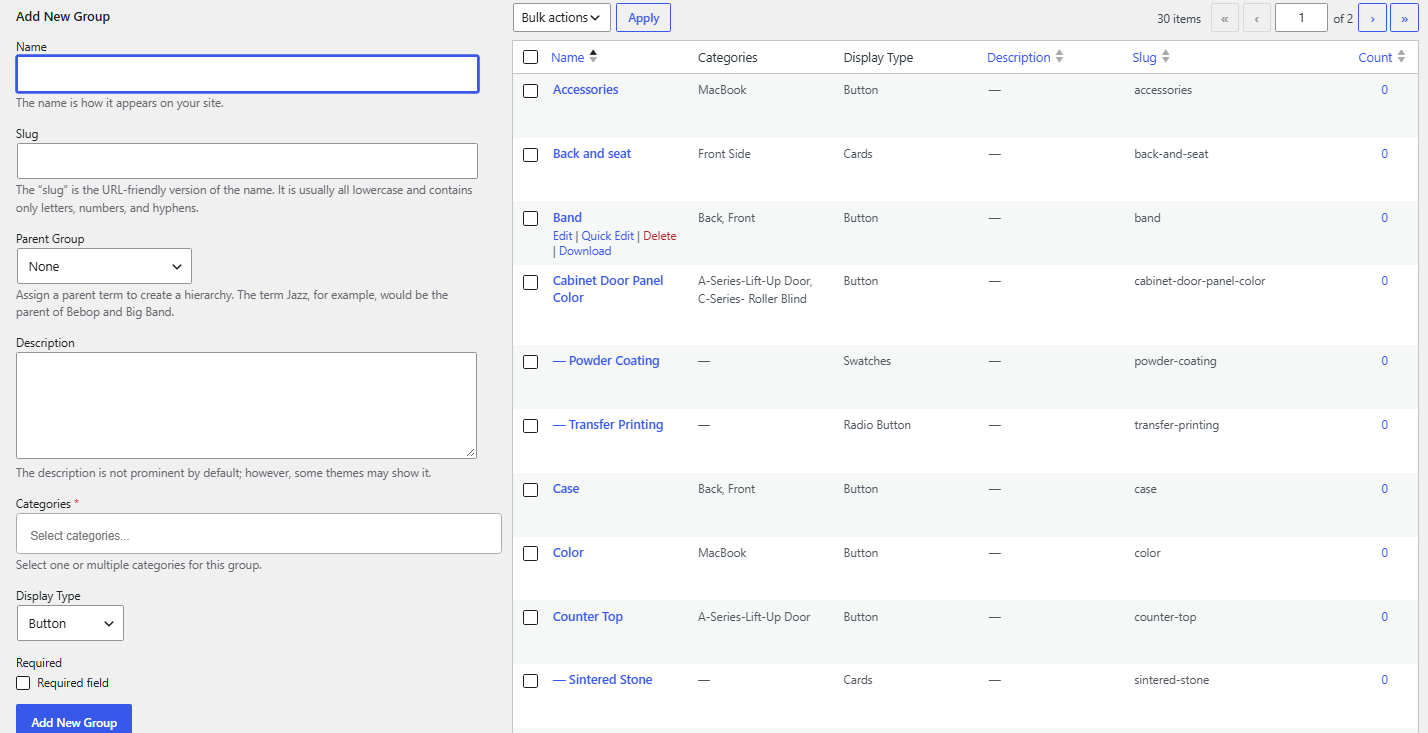
One of the plugin’s core features is its hierarchical configuration structure.
Administrators can create Product Types and Product Categories, define Configurator Groups and organize selectable options.
For example, a company selling modular furniture could create the following structure:
Product Type: Office Furniture
Product Category: Office Desks
Configurator Group: Desk Size
- Small
- Medium
- Large
Configurator Group: Surface Finish
- Natural Wood
- Dark Wood
- White
Configurator Group: Additional Features
- Cable Management
- Storage Drawer
- Keyboard Tray
This is an illustrative product structure, not a preloaded product catalog.
Administrators can adapt the hierarchy to match the products they offer.
Moreover, the plugin allows selected groups to be ordered within a product. Options within groups can also be rearranged using drag-and-drop controls.
As a result, businesses can present selections in a logical sequence rather than displaying unrelated choices together.
2. Offer Multiple Product Option Display Styles
Different products require different ways of presenting options.
For example, colors are often easier to understand through visual swatches, while product dimensions may work better in a dropdown.
Deviser Smart Product Configurator supports five group display styles:
- Buttons
- Radio-Style Options
- Color Swatches
- Image Options
- Dropdown Selectors
These options give administrators flexibility when designing the product configuration interface.
For instance, a business selling personalized interior products could display colors as swatches and available component types as image cards.
Meanwhile, measurements or standard selections might be easier to manage through dropdowns.
The objective is to present each choice in a way customers can understand.
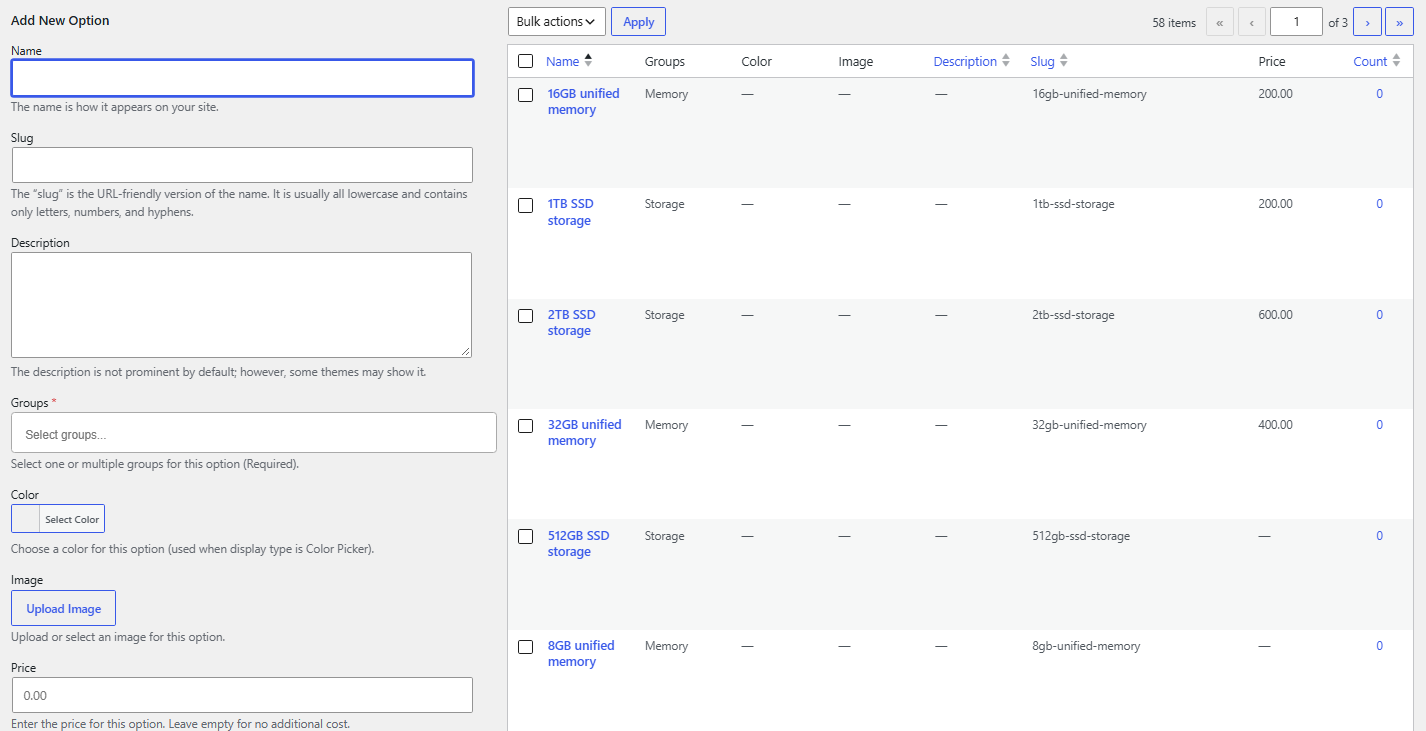
3. Calculate Prices Based on Selected Options
Customized products often have a starting price with additional charges for selected upgrades.
The plugin supports a base product price and individual option price adjustments.
For example, consider a hypothetical configurable office desk:
| Product selection | Illustrative price |
| Base Desk | $300 |
| Premium Surface Finish | +$50 |
| Storage Drawer | +$40 |
| Cable Management Accessory | +$20 |
| Total Configuration | $410 |
These prices are examples only.
The plugin calculates totals based on the base price and the option prices assigned by the administrator.
Therefore, visitors can see how their choices affect the displayed total.
Administrators can also configure the currency symbol used in the product interface.
However, calculated configurator totals should not be confused with a full e-commerce checkout calculation involving taxes, shipping or payment processing. Those capabilities are not described as included checkout functions in the current plugin listing.
4. Display Live Product Image Previews
A visual preview helps customers understand how their selections relate to the product being configured.
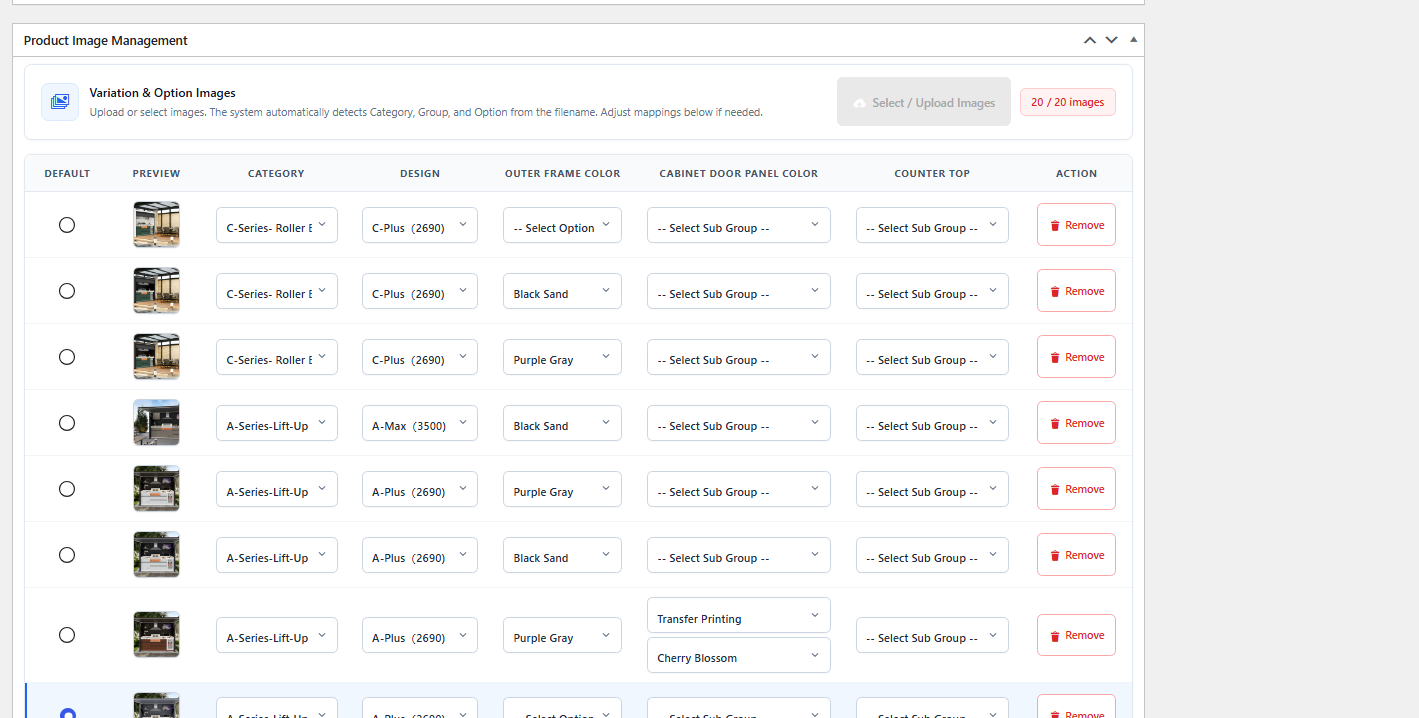
Deviser Smart Product Configurator supports image mappings based on selected categories, groups, subgroups and options.
For example, a business could prepare different product photographs for selected combinations of finishes and accessories.
When a configured combination has an associated image, the plugin can display the relevant preview.
Additionally, the frontend supports progressive combination thumbnails when matching images are available.
This provides a more informative product selection experience than a single static photograph.
How Product Image Mapping Works
Administrators configure the relevant product image combinations and associate them with selected options.
The plugin also supports a default combination image.
Importantly, the current listing specifies a limit of up to 20 image mappings per product.
When there is no dedicated image mapping for a particular selection, configured groups and options can still appear. The image resolver may reuse a compatible mapped image where possible.
If no usable image is found, the image area may display a placeholder.
Therefore, administrators should plan image combinations carefully and test the preview behavior before publishing.
5. Choose From Four Frontend Layouts
Every website has its own design requirements.
A product configurator should complement the surrounding page rather than force every product into the same layout.
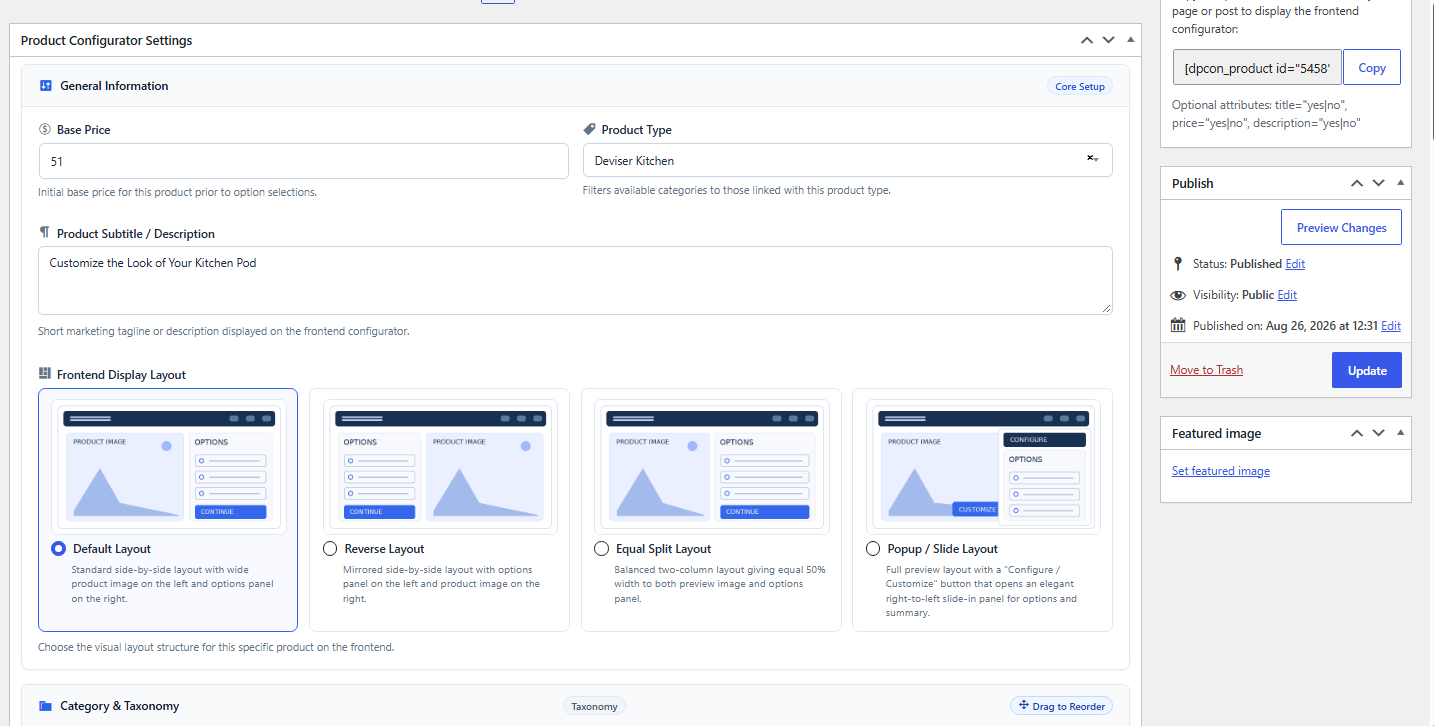
Deviser Smart Product Configurator provides four per-product frontend layouts.
Default Layout
The product image appears on the left, with the configuration options on the right.
This is suitable for a familiar product-page presentation.
Reverse Layout
The product image appears on the right, while the options are presented on the left.
This allows administrators to adapt the layout to their design.
Equal Split Layout
The interface divides the available space between the product image and its configuration area.
This can be useful when both the product preview and options require balanced attention.
Popup / Slide Layout
Configuration options appear through a slide-in panel.
This provides an alternative experience when the page design calls for a more compact presentation.
All four layouts are designed for responsive frontend use.
However, businesses should still test the selected layout on their actual theme, mobile devices and common screen sizes.
6. Capture Customer Enquiries With Built-In Forms
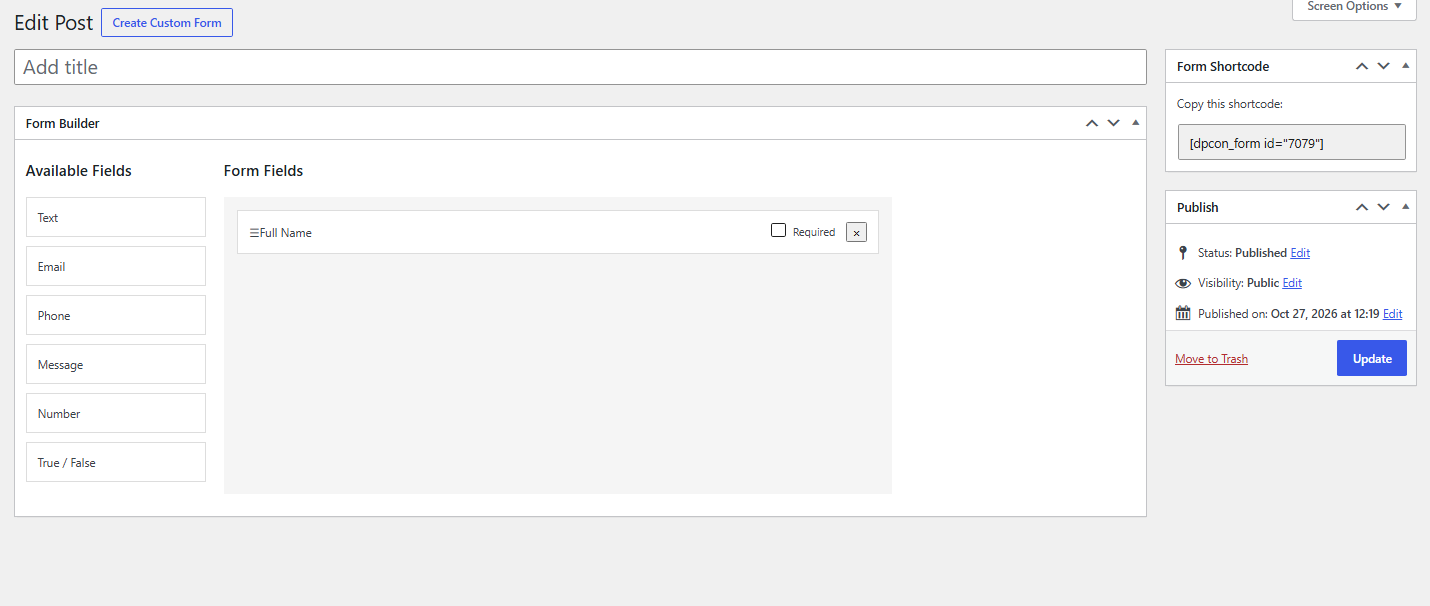
A particularly useful feature for made-to-order and quotation-based businesses is the built-in Custom Forms builder.
Instead of requiring every visitor to write out their selected product requirements, the plugin can include configuration information in the enquiry workflow.
The form builder supports:
- Text Fields
- Email Fields
- Phone Fields
- Message Fields
- Required-Field Settings
Administrators can choose a form globally or assign a particular form at product level.
The configuration summary can then be included in supported form submissions.
For example, a customer enquiring about a custom cabinet may select a cabinet category, finish and accessories before submitting their contact details.
The business receives a more structured enquiry containing the selected configuration.
How Enquiry Emails Work
The plugin uses WordPress’s wp_mail() function to send submitted enquiry details to the website administrator.
The email may include the customer’s configured form fields, selected product, options and calculated pricing.
Where an email address is provided, the plugin also attempts to send a confirmation email to the visitor.
However, successful delivery depends on the website’s WordPress email configuration.
A reliable SMTP or transactional mail setup may be appropriate for business-critical enquiries.
It is also important to note that the plugin currently supports its own built-in Custom Forms builder. External form plugins are not supported by the documented integration.
7. Provide a Clear Configuration Summary
Before sending an enquiry, visitors can review the information they selected.
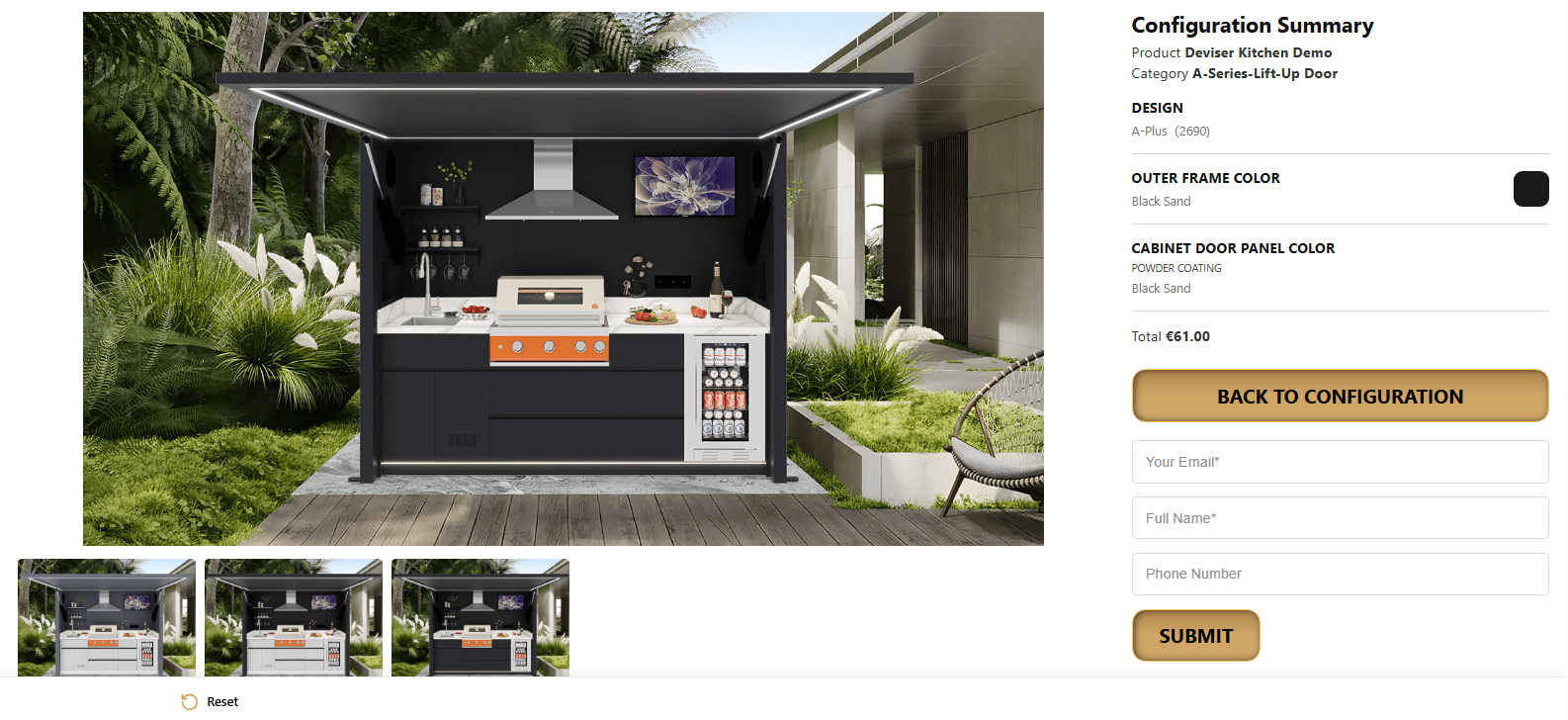
The configuration summary can include the current product, category, selected options, pricing and relevant image information.
This gives customers an opportunity to confirm their choices.
Additionally, businesses receive a clearer record of what the visitor requested.
For complex products, this can make the initial enquiry more useful.
For example, an equipment supplier may need the selected model, configuration and optional components to prepare a quotation.
The summary helps bring those details together.
8. Embed Products Using a WordPress Shortcode
After configuring and publishing a product, administrators can display the configurator on a WordPress page using a product-specific shortcode.
For example:
[dpcon_product id=”123″]Replace 123 with the actual published configurator product ID.
The plugin also supports optional shortcode attributes to control the visibility of the title, price and description.
For instance:
[dpcon_product id=”123″ title=”yes” price=”yes” description=”no”]The shortcode allows the configurator to be placed within the website’s chosen page structure.
This follows the broader WordPress approach to dynamic content. The WordPress Plugin Handbook’s explanation of shortcodes describes how developers can use shortcodes to include interactive functionality within pages.
How to Install Deviser Smart Product Configurator
Getting started involves installing the plugin and creating the necessary product structure.
The following process follows the official WordPress.org installation instructions.
Step 1: Install the Plugin
Visit the Deviser Smart Product Configurator plugin page and download the plugin.
Alternatively, search for the plugin in the WordPress plugin directory from your dashboard.
In WordPress:
- Open Plugins.
- Select Add New Plugin.
- Search for Deviser Smart Product Configurator or upload the downloaded ZIP.
- Install the plugin.
- Activate it.
The plugin adds product configurator administration functionality to WordPress.
Step 2: Create Product Types and Categories
Use the Product Configurator administration area to create the product types and categories your business needs.
For example, a furniture business may distinguish chairs, desks and storage systems.
Start with a simple hierarchy that reflects how customers understand the products.
Step 3: Create Configurator Groups
Add the groups that represent different product choices.
For example:
- Product Size
- Material
- Color
- Optional Accessories
Arrange the groups in a sequence that makes sense for visitors.
Step 4: Add Options and Prices
Create the choices within each group.
Configure option labels, colors or images where relevant.
Add individual option price adjustments when the selection changes the displayed total.
Step 5: Create a Custom Enquiry Form
Set up the fields required for customer enquiries.
For example, a business might request name, email address, phone number and a message.
Mark important fields as required.
Then choose the form appropriate to the product or set a global default.
Step 6: Create the Configurator Product
Create a new configurator product.
Assign the required categories and groups.
Set the base price, select the preferred layout and arrange the options.
If visual previews are needed, configure the relevant image combinations.
Step 7: Publish the Product
Review the product configuration and publish it.
Copy the product shortcode from the WordPress admin listing.
Step 8: Add It to a Website Page
Insert the shortcode into a WordPress page or other supported shortcode-rendering area.
Then preview the frontend experience.
Step 9: Test Before Launch
Before making the product available to customers:
- Test Every selectable option.
- Confirm Price adjustments.
- Check Image preview mappings.
- Review Mobile layouts.
- Test The Reset functionality.
- Verify Form submissions.
- Confirm Administrator email delivery.
- Review The submitted configuration summary.
This testing process helps ensure the configuration and enquiry experience works as intended.
Which Businesses Can Benefit From the Plugin?
Deviser Smart Product Configurator is especially relevant to businesses where customers select several product attributes before requesting information or a quotation.
Furniture and Interior Products
Furniture businesses may use configurable options for dimensions, finishes, materials and accessories.
For example, customers could select a desk size, finish and optional storage feature.
Manufacturing and Industrial Equipment
Equipment suppliers may offer products with different models, components and add-ons.
A configurator can help explain those available choices.
However, technical compatibility rules and complex engineering calculations should not be assumed to be included unless separately implemented and verified.
Home Improvement Products
Businesses offering doors, cabinets, panels and related products may use selection groups for materials, finishes and dimensions.
A structured enquiry can help clarify initial requirements.
Promotional and Personalized Products
Companies providing customized gifts or branded products may use selectable colors, styles and other supported options.
Where the product requires a detailed design workflow, additional functionality may still be necessary.
Made-to-Order Product Businesses
Businesses that prepare quotations before production can benefit from collecting selected options and customer information together.
However, the configuration process should reflect the actual options and limitations of each product.
Deviser Smart Product Configurator vs a Standard WordPress Product Page
A conventional product page can display information about available choices.
However, a dedicated configurator provides a more structured selection experience.
| Feature | Standard Product Page | Deviser Smart Product Configurator |
| Product Description | Static product information | Product information with configurable selections |
| Options | Often described in text | Grouped selectable options |
| Group Hierarchy | Usually manual content structure | Categories, groups and subgroups |
| Product Images | Standard gallery | Mapped live preview for configured combinations |
| Pricing | Typically a stated price | Base price plus option adjustments |
| Frontend Layout | Depends on the page design | Four documented configurator layouts |
| Customer Enquiry | Standard form or email | Built-in form with configuration summary |
| Reusability | Depends on page implementation | Product-specific shortcode |
This comparison describes differences in the documented features, not a claim that every standard WordPress product page lacks customization.
For example, other WordPress plugins and e-commerce platforms may provide additional product configuration options.
The appropriate solution depends on whether the business needs a quotation-based configurator, a complete checkout system or more advanced customization functionality.
How the Plugin Can Support Better Customer Enquiries
Many businesses focus on generating more enquiries.
However, the amount of useful information included in each enquiry also matters.
For example, a manufacturer may receive two messages.
The first says:
“I need a custom product. Please send the price.”
The second contains the selected product, category, material, accessories and a calculated configuration total.
The second enquiry may provide more useful information for preparing a response.
This is the business problem that a structured product configurator can help address.
Potential Benefits for Customers
Customers may find it easier to understand available choices, compare option prices and communicate their preferred configuration.
Potential Benefits for Sales Teams
Sales staff may receive more complete initial requirements, reducing the need to ask customers to repeat basic selections.
Potential Benefits for Website Administrators
Administrators can manage configurator groups, pricing and layout settings through the WordPress interface.
However, these are practical potential benefits. The plugin’s official listing does not establish a specific increase in sales, enquiries or conversion rates.
Businesses should measure those outcomes on their own websites.
Practical Example: Configuring a Custom Office Desk
Consider a hypothetical furniture manufacturer that offers customized office desks.
The business provides several desk sizes, surface finishes and optional accessories.
Before introducing a configurator, visitors need to read lengthy descriptions and contact the business to explain their preferred combination.
Using Deviser Smart Product Configurator, the administrator could create a product with the relevant categories and option groups.
Example Configuration
The visitor selects:
- Product: Office Desk
- Size: Large
- Finish: Natural Wood
- Additional Feature: Storage Drawer
- Accessory: Cable Management
The frontend displays the applicable price adjustments and shows an available matching image where one has been mapped.
Before submitting an enquiry, the visitor reviews the summary.
The built-in form then collects the customer’s contact details along with the configuration information.
Business Value
This structure makes product requirements easier to communicate.
Moreover, the company can use the submitted details as a starting point for discussing availability, final pricing or manufacturing requirements.
However, the final quotation still depends on the business’s own processes.
This is an illustrative workflow, not a measured Techno Deviser client case study.
Important Things to Know Before Installing
A useful plugin article should explain both capabilities and limitations.
Image Mappings Have a Documented Limit
The current WordPress.org listing specifies up to 20 image mappings per product.
Businesses with many visual combinations should consider this during product planning.
External Form Plugins Are Not Supported
The documented enquiry workflow uses the plugin’s own Custom Forms builder.
It should not be presented as a native integration with Contact Form 7, WPForms or another third-party form plugin.
Checkout Is Not the Same as Enquiry Submission
The plugin provides configuration pricing, summary and enquiry functionality.
Its current listing does not advertise a complete cart, payment gateway or checkout system.
Therefore, businesses needing direct online purchases should evaluate their wider e-commerce requirements separately.
Google Fonts Are Optional
The plugin allows administrators to select Google-hosted fonts through its typography settings.
By default, no Google font is selected.
If a Google-hosted font is enabled, visitors may make requests to Google’s font servers.
Therefore, administrators should review relevant privacy requirements.
Enquiry Email Delivery Depends on WordPress
The plugin uses the website’s WordPress mail functionality.
If the site’s email configuration is unreliable, enquiries may not be delivered successfully.
Therefore, form testing is essential before publishing.
Why Techno Deviser Developed a Product Configuration Solution
Techno Deviser works across website development, e-commerce and custom digital experiences.
For businesses selling products with several available choices, the challenge is often more complicated than presenting a standard product page.
Customers need an understandable selection process.
Administrators need a manageable product structure.
Sales teams need enough information to respond to enquiries accurately.
Deviser Smart Product Configurator brings these requirements together through a configurable WordPress experience.
Its combination of hierarchical options, pricing adjustments, image mapping, responsive layouts and built-in enquiries makes it a practical option for businesses that want a structured product configuration workflow.
Furthermore, the plugin is distributed through the official WordPress Plugin Directory under the GPL v2-or-later license.
Businesses that need additional custom website functionality can also explore Techno Deviser’s web and e-commerce development services.
For website owners interested in other Techno Deviser WordPress tools, the Deviser Shield plugin article explains how plugin activity monitoring can support website maintenance and security awareness.
Frequently Asked Questions
What is Deviser Smart Product Configurator?
Deviser Smart Product Configurator is a WordPress plugin for creating products with configurable categories, groups, subgroups, selectable options, image previews, calculated prices and built-in enquiry forms.
Is Deviser Smart Product Configurator available on WordPress.org?
Yes. The plugin is published in the official WordPress Plugin Directory. Users can visit its listing to review features, screenshots, installation instructions and download information.
Can the plugin display different product images?
Yes. Administrators can map product images to selected categories and option combinations. The frontend displays a matching preview where one is available. The current listing specifies up to 20 image mappings per product.
Does the plugin support different option styles?
Yes. Supported styles include buttons, radio-style options, color swatches, image options and dropdown selectors.
Can product prices change when customers select options?
Yes. Administrators can define a base product price and option-specific price adjustments. The frontend calculates the displayed total based on those selections.
Can customers submit their selected product configuration?
Yes. The built-in enquiry form can include product configuration details and selected pricing information. Submitted enquiries are sent using WordPress's mail functionality.
Does the plugin work with Contact Form 7 or WPForms?
The current version documents support for its own Custom Forms builder only. External form plugin integrations are not supported.
Does the plugin include WooCommerce checkout?
The official listing describes configuration, pricing, summaries and enquiry forms, but does not advertise integrated WooCommerce cart or payment checkout functionality.
Can I change the frontend layout?
Yes. The plugin supports Default, Reverse, Equal Split and Popup / Slide layouts. Each product can use its own selected layout.
How do I display a configurable product on my website?
Publish the configurator product and insert its product-specific shortcode into a WordPress page. For example, [dpcon_product id=123] displays the product associated with that ID.
Ready to Create Customizable Products on Your WordPress Website?
Explore the plugin’s features, review its official screenshots and download it from the WordPress Plugin Directory.
Download Deviser Smart Product Configurator
If your business needs a more advanced product configuration experience, custom website functionality or broader e-commerce development, contact Techno Deviser to discuss your project requirements.
A well-designed product configurator can make complicated choices easier to understand and help businesses collect more useful customer enquiries.
Table of Content
- Introduction
- What Is Deviser Smart Product Configurator?
- Why Use a Product Configurator?
- Why Customizable Products Need a Better Website Experience
- Main Features of Deviser Smart Product Configurator
- How to Install Deviser Smart Product Configurator
- Which Businesses Can Benefit From the Plugin?
- Deviser Smart Product Configurator vs a Standard WordPress Product Page
- How the Plugin Can Support Better Customer Enquiries
- Practical Example: Configuring a Custom Office Desk
- Why Techno Deviser Developed a Product Configuration Solution
- Frequently Asked Questions
Leave a comment
Your email address will not be published. Required fields are marked *